LUT Loading and Management
Look-Up Tables (LUTs) encode precomputed color transforms that can replicate complex grading operations, film stock emulations, and color space conversions in constant time per pixel. OpenRV Web supports loading external LUT files and provides built-in film emulation presets, all processed on the GPU for real-time performance.
1D vs 3D LUTs
1D LUTs
A 1D LUT applies an independent curve to each color channel. Each input value maps to a single output value per channel. 1D LUTs handle gamma correction, contrast curves, and per-channel color balance, but cannot model cross-channel interactions such as hue rotation or color matrix transforms.
3D LUTs
A 3D LUT maps every possible (R, G, B) input triplet to a new output triplet. The data is arranged as a cube where each axis represents one input channel. 3D LUTs can encode any color transform including hue shifts, saturation changes, film stock emulations, and complete color space conversions.
OpenRV Web uses hardware trilinear interpolation for 3D LUT sampling on the GPU via WebGL2 TEXTURE_3D with LINEAR filtering. The LUT data is uploaded with RGB32F precision for full floating-point accuracy. A higher-accuracy tetrahedral interpolation path is available for CPU-side offline processing (TetrahedralInterp.ts).
Supported Formats
| Format | Extension | Type | Description |
|---|---|---|---|
| Adobe/Resolve Cube | .cube | 1D and 3D | Industry standard. Supports TITLE, DOMAIN_MIN, DOMAIN_MAX. |
| Autodesk 3DL | .3dl | 1D and 3D | Lustre/Flame format. Integer values auto-normalized. |
| Rising Sun CSP | .csp | 1D and 3D | CineSpace format with per-channel pre-LUT shapers. |
| IRIDAS ITX | .itx | 3D | IRIDAS SpeedGrade format. |
| IRIDAS Look | .look | 3D | XML-based IRIDAS format. |
| Houdini LUT | .lut | 1D and 3D | Houdini channel (C) and 3D types. |
| Nuke Vectorfield | .nk | 3D | Nuke exported vectorfield format. |
| Pandora MGA | .mga | 3D | Pandora color corrector format. |
| RV 3D LUT | (native) | 3D | OpenRV native 3D format. |
| RV Channel LUT | (native) | 1D | OpenRV native 1D format. |
Loading a LUT
- Open the color controls panel (press
C). - In the LUT section at the bottom, click the Load button.
- Select a LUT file in any supported format.
- The LUT is applied immediately to the viewport.
The active LUT name appears below the Load button for quick identification.
To clear the current LUT, click the Clear button. The image reverts to its ungraded state.
Intensity Slider
The LUT intensity slider (0% to 100%) controls how strongly the LUT affects the image. At 100%, the full LUT transform is applied. At 0%, the original image is displayed. Intermediate values linearly blend between the original and LUT-processed colors.
This is implemented in the GPU shader as:
color = mix(original, lutResult, intensity)Use the intensity slider to:
- Preview a LUT at partial strength before committing
- Dial in a film emulation without fully replacing the original look
- A/B compare the LUT effect by dragging between 0% and 100%
Pipeline Note
In a VFX pipeline, LUTs serve three distinct roles: camera LUTs (IDTs) convert camera-native log/gamut to a working space, show LUTs apply the creative look defined by the colorist for the project, and display LUTs calibrate for the specific monitor or projector. OpenRV Web's three-slot pipeline mirrors this exact structure. The .cube format is the industry standard accepted by virtually every grading and compositing application.
VFX Use Case
When reviewing dailies, load the show LUT provided by the DI colorist into the Look LUT slot (slot 2). This ensures all departments see the same creative intent during review. If the footage also needs an input transform (e.g., camera manufacturer's technical LUT), load it into the File LUT slot (slot 1) so both transforms are applied in the correct order.
Three-Slot LUT Pipeline
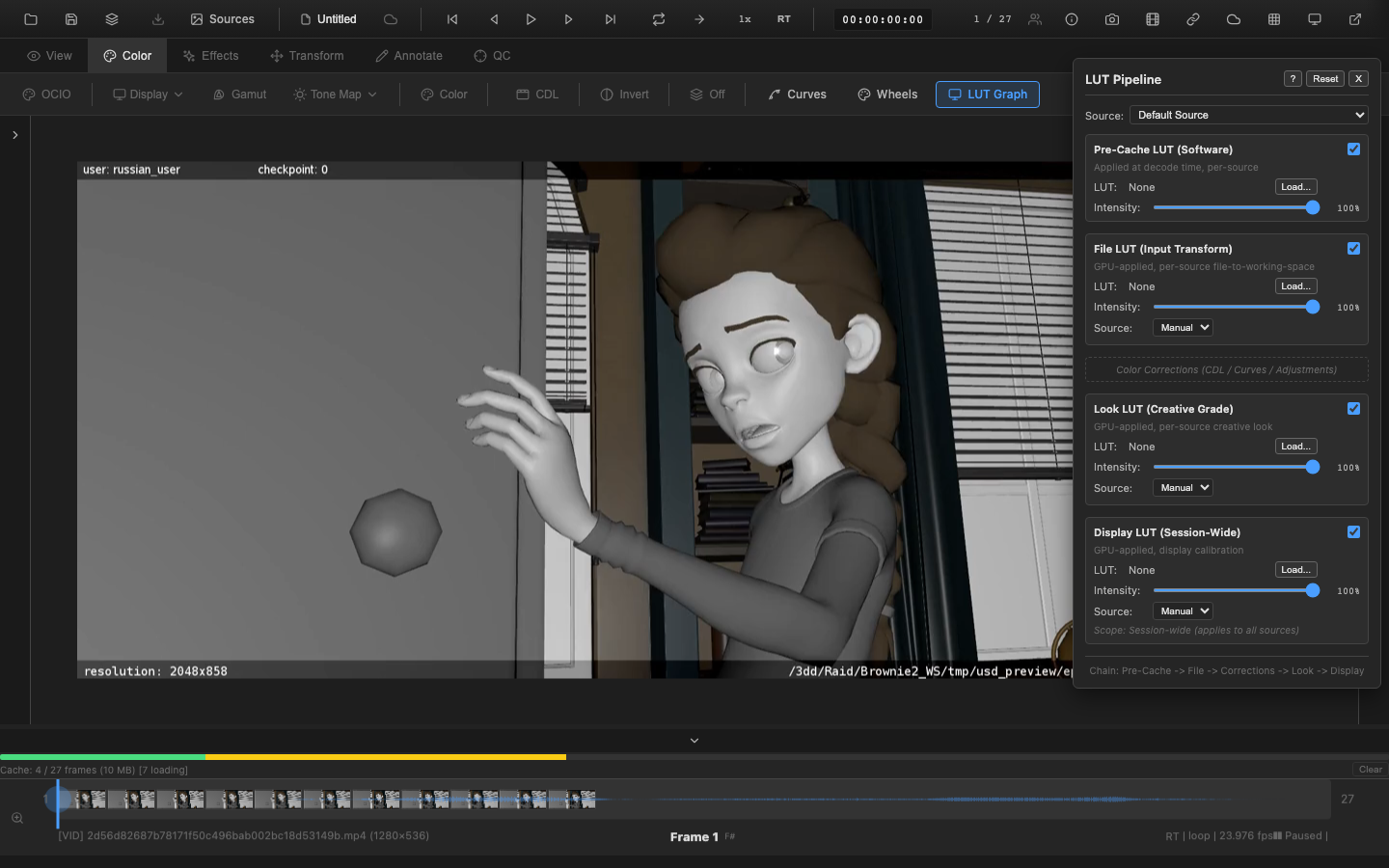
OpenRV Web supports three independent LUT slots, each serving a distinct role in the pipeline:
| Slot | Name | Scope | Pipeline Position | Purpose |
|---|---|---|---|---|
| 1 | File LUT | Per-source | Stage 0e-alt (after EOTF) | Input device transform. Replaces automatic input primaries conversion. |
| 2 | Look LUT | Per-source | Stage 6d (after CDL/curves) | Creative color grade. The primary LUT slot for look development. |
| 3 | Display LUT | Session-wide | Stage 7d (after output primaries) | Display calibration. Applied to all sources after gamut mapping. |
Each slot has its own intensity control and operates independently. The Look LUT is the slot exposed through the color controls panel Load button.
Output Color Space Declaration
Each LUT stage (Pre-Cache, File, Look, and Display) can additionally declare what color space its output is encoded in -- specifically the output color primaries (bt709, bt2020, p3) and transfer function (srgb, hlg, pq, smpte240m). This is metadata, not a pixel transform: the GPU shader still performs the color math; the declaration tells the renderer and downstream tools (scopes, observability panels) what the post-LUT pixels actually represent. For example, declaring a Display LUT's output as srgb after a PQ source ensures the renderer applies the sRGB EOTF rather than treating the pixels as still-PQ-encoded.
Declarations cascade through the pipeline in order Pre-Cache -> File -> Look -> Display, with null meaning "preserve input" and a concrete value meaning "override". Disabled, no-LUT-loaded, and zero-intensity stages are bypassed at render time and therefore do not contribute to the cascade. The framework propagates the cascaded metadata onto the IPImage handed to the renderer (issue MED-51), and is HDR-video-safe via a non-owning cloneMetadataOnly() clone that shares the underlying VideoFrame reference.
Film Emulation Presets
OpenRV Web includes built-in film emulation presets that generate programmatic 17x17x17 3D LUTs:
| Preset | Category | Description |
|---|---|---|
| Warm Film | Film | Warm golden tones reminiscent of Kodak film stocks |
| Cool Chrome | Film | Cool silver tones with blue shadows |
| Bleach Bypass | Film | Desaturated with increased contrast |
| Cross Process | Creative | Color-shifted look from cross-processing |
| Monochrome | B&W | Classic black and white conversion using Rec. 709 weights |
| Teal & Orange | Creative | Hollywood-style teal shadows with orange highlights |
| Vintage Fade | Creative | Lifted blacks with faded pastel tones |
| High Contrast | Technical | S-curve contrast enhancement |
| Low Contrast | Technical | Reduced contrast for a flat starting point |
| Identity (Bypass) | Technical | No color change -- for testing the LUT pipeline |
Film emulation presets are selected from the LUT presets dropdown and applied as 3D LUTs through the Look LUT slot.
Scripting API
// Load a parsed LUT object (or null to clear)
window.openrv.color.loadLUT(parsedLut);

// Set LUT intensity (0 = bypass, 1 = full effect)
window.openrv.color.setLUTIntensity(0.75); // 75%

// Clear the active LUT
window.openrv.color.clearLUT();

// Apply a built-in film emulation preset
window.openrv.color.applyLUTPreset('warm-film');
Available ColorAPI Methods
The following color methods are currently available via window.openrv.color:
setAdjustments()/getAdjustments()/reset()-- primary color adjustmentssetCDL()/getCDL()/resetCDL()-- CDL valuessetCurves()/getCurves()/resetCurves()-- curves editingexportCurvesJSON()/importCurvesJSON()-- curves serializationloadLUT()/clearLUT()/setLUTIntensity()/applyLUTPreset()-- LUT operationssetToneMapping()/getToneMapping()-- tone mappingsetDisplayProfile()/getDisplayProfile()/getDisplayCapabilities()-- display managementsetOCIOState()/getOCIOState()/getAvailableConfigs()-- OCIO pipelinesetLUTStageColorPrimaries(stage, primaries)/getLUTStageColorPrimaries(stage)-- declared output primaries per LUT stage (MED-51)setLUTStageTransferFunction(stage, transfer)/getLUTStageTransferFunction(stage)-- declared output transfer function per LUT stage (MED-51)
Stage Output Color Space (MED-51)
Each LUT pipeline stage (Pre-Cache, File, Look, Display) can declare what color space its output is encoded in. This is metadata only -- the GPU shader still runs the LUT math; the declaration tells the renderer/scopes what the post-LUT pixels actually represent so the correct downstream EOTF / scope normalization is selected.
Setting via the LUT Pipeline Panel
Open the LUT Pipeline panel. Each stage row exposes two dropdowns:
- Output Primaries -- Auto (passthrough) | Rec. 709 | Rec. 2020 | DCI-P3
- Output Transfer -- Auto (passthrough) | sRGB | HLG | PQ | SMPTE 240M | Linear
Pre-Cache is wrapped in an "Advanced" disclosure since color-space conversion in the pre-cache stage is uncommon.
Common Workflows
- PQ -> sRGB Display LUT: Set Display stage Output Primaries to Rec. 709 and Output Transfer to sRGB.
- ACES -> Rec.709 Look LUT: Set Look stage Output Primaries to Rec. 709 and Output Transfer to Auto (the LUT typically stays in scene-linear).
- Camera log -> linear File LUT: Set File stage Output Transfer to Linear (LUT bakes in the EOTF decode).
Leave Auto unless you know your LUT performs the conversion. Declarations are saved with your session.
Known Limitations
- AP1 / AP0 ACES primaries: not yet representable in
ColorPrimariesenum (bt709,bt2020,p3only). Use the closest display approximation in v1. - OCIO-active conflict: when OCIO is enabled and overriding the display stage, manual declarations are stored but do not affect rendering until OCIO is disabled. A console warning fires once per session.
Implausibility Detection
The opt-in LUTPipelineLinter (see scripting docs) detects suspicious declarations like declaring an HDR transfer (PQ, HLG) that matches the source's transfer -- usually means the LUT didn't actually decode the transfer and the renderer would produce double-decoded output. Set the declaration to the actual post-LUT transfer (often srgb).
Related Pages
- LUT System Technical Reference -- format specifications, interpolation algorithms, memory layout, and GPU implementation details
- OCIO Integration -- LUT interaction with OCIO color management
- Primary Color Controls -- primary color adjustments
- Rendering Pipeline -- three LUT slots in the full pipeline