CDL Workflow
ASC CDL (American Society of Cinematographers Color Decision List) is an industry-standard format for communicating color correction values between production and post-production. OpenRV Web supports full CDL grading with real-time GPU preview and file interchange.
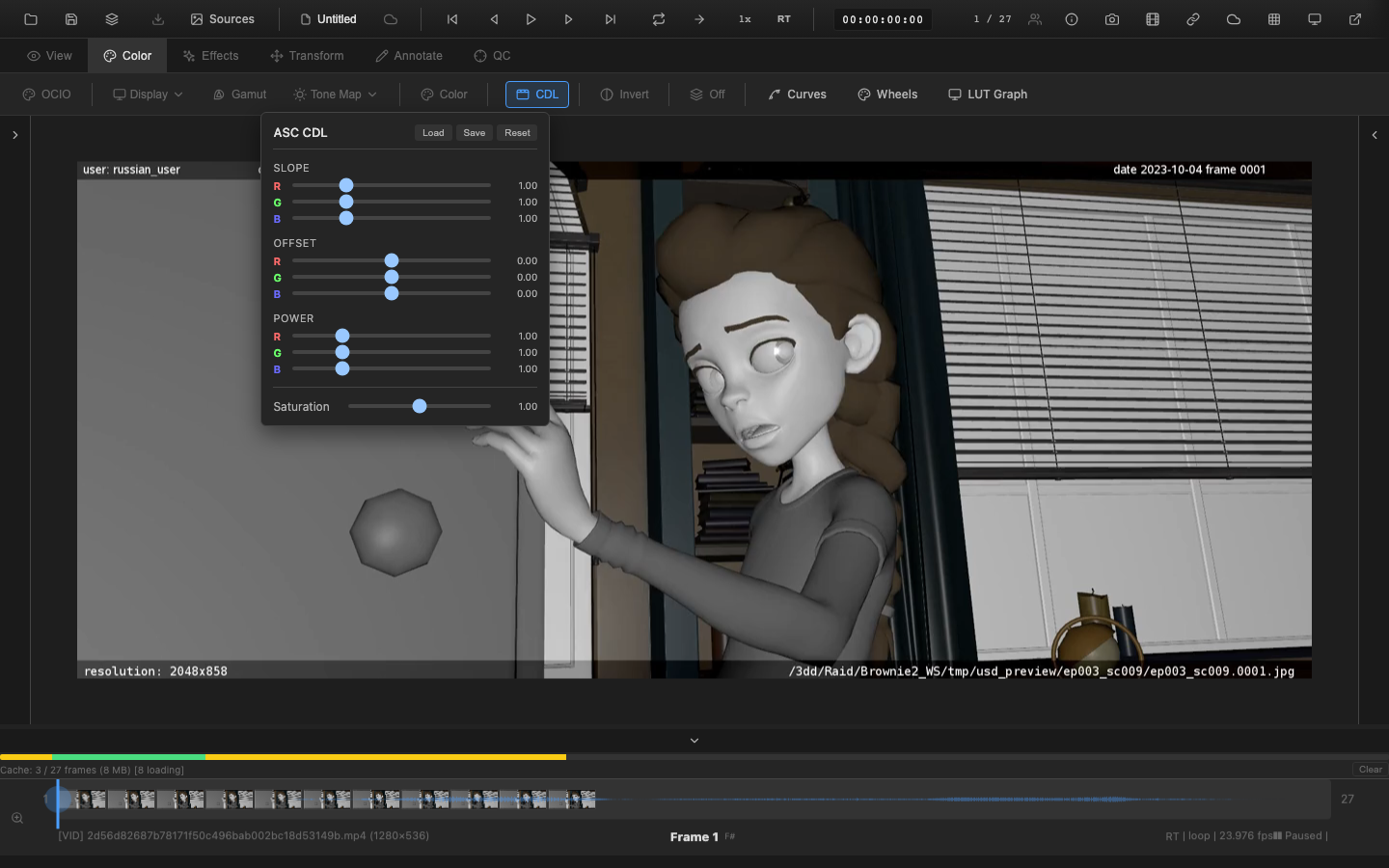
Opening the CDL Panel
Navigate to the Color tab (key 2) and click the CDL button. The CDL button highlights when non-default values are applied, providing visual feedback that a CDL grade is active.
SOP + Saturation Model
CDL uses four parameters, collectively known as SOP+Sat:
Slope (Multiplier)
| Channels | Range | Default |
|---|---|---|
| R, G, B | 0.0 to 4.0 | 1.0 |
Slope multiplies the input value. It functions like a per-channel exposure or gain control. A slope of 2.0 doubles the channel value; a slope of 0.5 halves it.
Offset (Addition)
| Channels | Range | Default |
|---|---|---|
| R, G, B | -1.0 to +1.0 | 0.0 |
Offset adds a constant value to the channel after the slope multiplication. Positive offset lifts the blacks; negative offset crushes them.
Power (Gamma)
| Channels | Range | Default |
|---|---|---|
| R, G, B | 0.1 to 4.0 | 1.0 |
Power applies a gamma curve to the result of slope and offset. Values below 1.0 brighten midtones; values above 1.0 darken them. Negative intermediate values are clamped to zero before the power function to prevent undefined results.
Saturation
| Channels | Range | Default |
|---|---|---|
| Global | 0.0 to 2.0 | 1.0 |
Saturation is applied after the SOP transform. It interpolates between the Rec. 709 luminance and the color value. At 0.0, the image is fully desaturated. At 1.0, saturation is unchanged.
Processing Formula
The CDL transform follows the ASC specification:
out = pow(max(in * slope + offset, 0), power)
luma = 0.2126 * R + 0.7152 * G + 0.0722 * B
final = luma + (out - luma) * saturation
The ordering is always Slope, then Offset, then Power, then Saturation. This is mandatory per the ASC CDL standard.
Pipeline Note
CDL is the standard interchange format for communicating color decisions between on-set (live grading), editorial (Resolve/Baselight), and final DI. A typical dailies workflow starts with the DIT applying a CDL on set, which is exported as a .cdl or .ccc file and carried through editorial into the review tool. OpenRV Web can load these files directly, ensuring continuity from set to screen.
VFX Use Case
CDL files exported from OpenRV Web are compatible with DaVinci Resolve, Baselight, Nuke (OCIOCDLTransform), and other ASC CDL-compliant tools. Use the Save function to hand off a look from review back to the colorist or compositor without any baked-in transforms.
Loading and Saving CDL Files
Loading
Click Load in the CDL panel header to import a CDL file. Supported formats:
| Format | Extension | Description |
|---|---|---|
| CDL | .cdl | Single color decision in XML format |
| CC | .cc | Single <ColorCorrection> element |
| CCC | .ccc | <ColorCorrectionCollection> containing multiple entries |
When loading a CCC file with multiple corrections, the first entry is applied. Each entry may include an id attribute for identification.
Saving
Click Save to export the current CDL grade as a .cdl XML file. The exported file uses the ASC CDL v1.2 namespace and includes the full SOP and saturation values with six decimal places of precision.
Reset
Click Reset in the CDL panel header to restore all CDL parameters to their defaults (slope 1.0, offset 0.0, power 1.0, saturation 1.0). Double-click any individual slider to reset only that parameter.
Pipeline Position
CDL is applied at stage 6b in the rendering pipeline, after color wheels and before curves and LUT grading. The CDL transform optionally supports an ACEScct working colorspace: when enabled, values are converted from linear to ACEScct before the SOP+Sat operation and converted back afterward, matching the behavior expected by ACES-based workflows.
Scripting API
setCDL() and getCDL() are available on window.openrv.color:
// Set CDL values
window.openrv.color.setCDL({
  slope: { r: 1.1, g: 1.0, b: 0.9 },
  offset: { r: 0.0, g: 0.0, b: 0.02 },
  power: { r: 1.0, g: 1.0, b: 1.0 },
  saturation: 1.2
});

// Get current CDL values
const cdl = window.openrv.color.getCDL();// Reset CDL to defaults (slope 1.0, offset 0.0, power 1.0, saturation 1.0)
window.openrv.color.resetCDL();Related Pages
- CDL Technical Reference -- ASC CDL formula details, file format specification, and implementation notes
- Primary Color Controls -- exposure, contrast, and other primary adjustments
- Curves Editor -- spline-based tonal adjustments
- OCIO Integration -- CDL within an OCIO-managed pipeline
- Rendering Pipeline -- full pipeline stage ordering