Slate and Frameburn
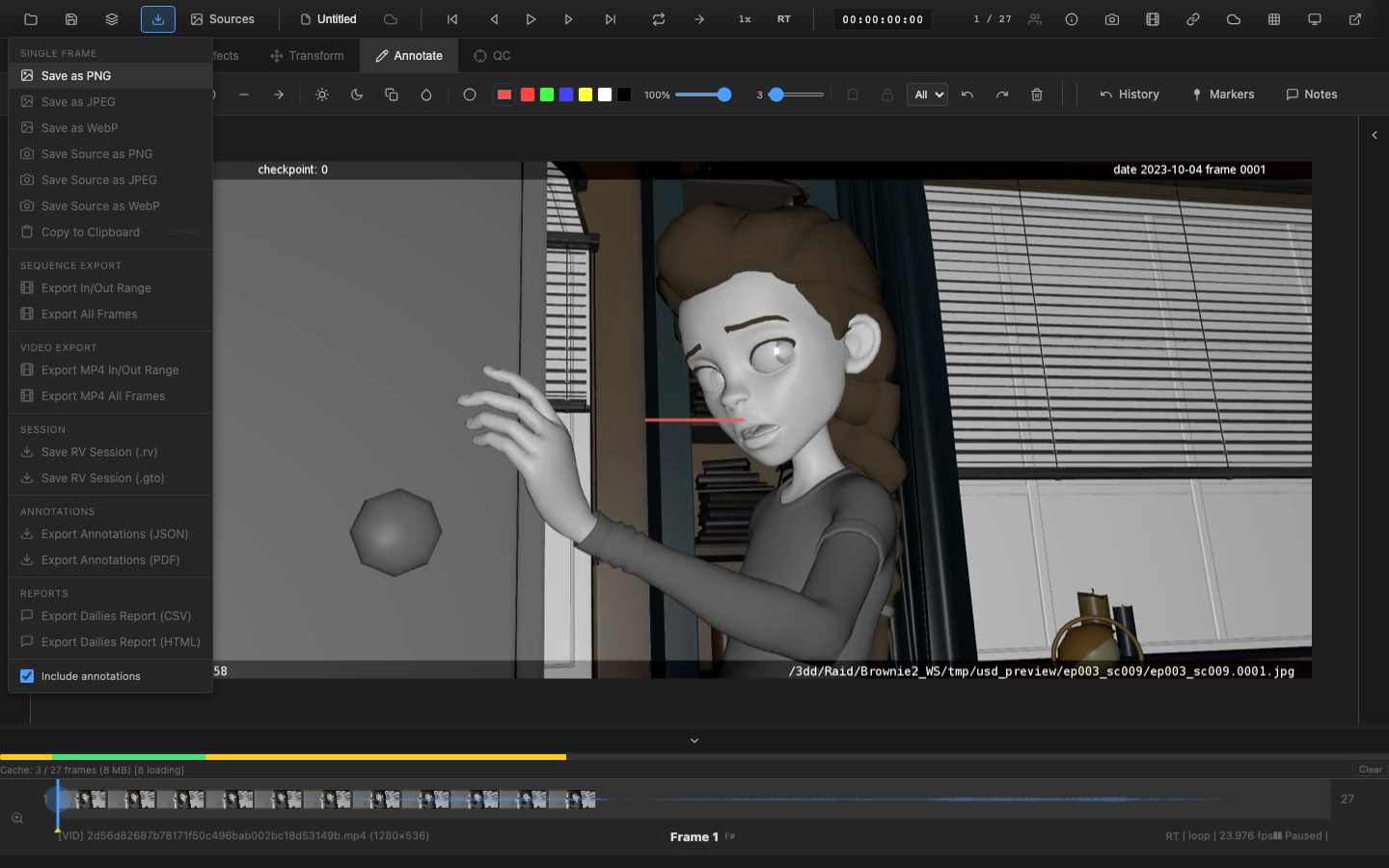
Slate frames and frameburn overlays add production metadata to exported video and image sequences. These features are standard in professional post-production for identifying deliverables and tracking review content.
Who uses this
Production teams delivering dailies to editorial, clients, or internal review rely on slate and frameburn to meet industry-standard delivery specs. Timecode burn-in, shot identification, and confidentiality watermarks are expected on every professional deliverable.
Slate (Leader Frames)
A slate is a title card inserted at the beginning of an exported video containing production metadata. It serves as identification for the content that follows.
Slate Contents
The slate can include the following fields:
| Field | Description |
|---|---|
| Show | Production or project name |
| Shot | Shot identifier |
| Version | Version number or label |
| Artist | Name of the responsible artist |
| Date | Creation or export date |
| Timecode | Starting timecode of the content |
| Resolution | Image dimensions (e.g., 1920x1080) |
Studio Logo
A logo image can be placed on the slate. Configure the logo position, and the slate compositor renders it alongside the metadata text.
Custom Fields
Additional fields beyond the standard set can be added for project-specific metadata. Custom field labels and values are configurable in the slate editor.
Slate Editor
The Slate Editor UI provides a live preview of the slate as fields are edited. Typography (font, size, weight), colors (text, background), and layout can be customized. Changes appear immediately in the preview pane.
Slate in Export
When enabled, the slate frame is prepended to the exported video. The number of slate frames (and therefore the duration of the slate display) is configurable.
Frameburn (Burn-In)
Frameburn composites text overlays onto every frame of the exported content. Unlike the slate (which appears only at the beginning), frameburn persists throughout the entire video.
Available Burn-In Fields
| Field | Description |
|---|---|
| Timecode | SMPTE timecode (HH:MM:SS:FF) |
| Frame number | Absolute frame number |
| Shot name | Shot identifier |
| Date | Export or creation date |
| Resolution | Image dimensions |
| FPS | Frame rate |
| Color space | Active color space |
| Codec | Video codec used |
| Custom text | Free-form text field |
Positioning
Each burn-in field can be positioned at standard locations on the frame:
- Top-left, top-center, top-right
- Bottom-left, bottom-center, bottom-right
Fields at the same position stack vertically.
Typography
Configure font size, weight, and color for burn-in text. A semi-transparent background can be added behind the text to ensure readability against any image content.
Pipeline Note
Most studios require specific frameburn formats for dailies delivery. A typical requirement includes: timecode (top-left), frame number (top-right), shot name and version (bottom-left), and date (bottom-right). Client review deliveries often add "CONFIDENTIAL" or watermark text. Check your facility's delivery spec before configuring burn-ins -- incorrect or missing burn-in fields are a common cause of rejected dailies submissions.
VFX Use Case
For editorial hand-off, always include both SMPTE timecode and absolute frame number in the burn-in. Timecode allows editorial to sync against the master timeline, while frame numbers let artists reference specific frames in review notes (e.g., "fix edge artifact at frame 1047"). Including the color space in the burn-in helps prevent downstream confusion about the intended viewing transform.
Common Workflows
Dailies Export
- Configure the slate with show, shot, version, artist, and date
- Enable frameburn with timecode and frame number
- Export the video with slate prepended
- The resulting video identifies itself and provides frame reference throughout
Client Review
- Add the studio logo to the slate
- Enable frameburn with timecode, shot name, and "CONFIDENTIAL" custom text
- Export for client delivery with clear identification and tracking
Internal Review
- Enable frameburn with frame number and shot name (no slate)
- Export for internal review where quick frame reference is needed
Integration with Export
Slate and frameburn settings are configured before starting a frame or video export. When exporting:
- Frame export (
Ctrl+S): Frameburn is applied to the exported image if enabled - Video export: Both slate and frameburn are applied
- Sequence export: Frameburn is applied to each frame; slate can be added as the first frame(s)
Related Pages
- Frame Export -- export individual frames
- Video Export -- encode video with slate and burn-in
- EDL and OTIO -- export edit decision lists